How to Catch Santa on Camera on Christmas Eve (2026 Guide)
 Santa Caught on Camera
Five ways to "catch" Santa on camera this Christmas Eve, from the old phone-in-the-corner trick to a video of Santa in your own living room that says your child's name.
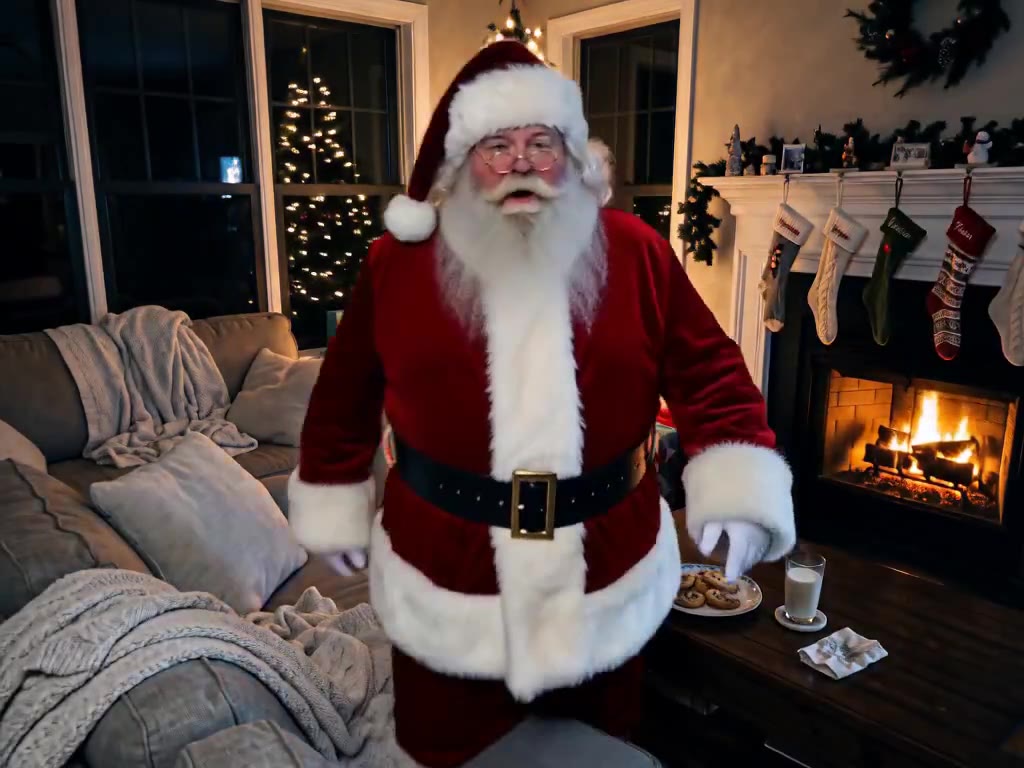
Every December, parents look for a way to show their kids that Santa really came. A cookie with a bite out of it is good. Boot prints in flour are better. But nothing beats footage: Santa caught on your own camera, in your own living room, on the night itself.
Here are five ways to do it, from the simplest to the most convincing.
1. The phone on the bookshelf
The classic: leave an old phone recording in a corner before bed, then "find" it in the morning. It shows you were trying, which kids love, but the footage is empty unless someone dresses up as Santa. If an uncle owns a Santa suit, this is your night.
2. Santa sticker apps
For more than a decade, apps have let you paste a Santa cut-out onto a photo of your room. They're quick and often free. The catch is that kids spot a sticker fast: the lighting doesn't match, Santa is the same pose every year, and nothing moves.
3. A Santa video from the North Pole
Personalized Santa messages filmed at a North Pole set can say your child's name, and many are free. They're lovely, but they show Santa somewhere else. They don't answer the question kids actually ask on Christmas morning: did he come here?
4. A photo of Santa in your own room
This is where AI changes things. Upload a photo of your living room and you can get a still of Santa bending down by your tree, lit by your lights. Try it free: it takes about a minute and you don't need an account.
5. A video of Santa caught on your camera
The most convincing option is a short clip that looks like your home camera recorded it. Santa walks in, sets a present under the tree, notices the camera, and talks to your child:
"Ho ho ho! Merry Christmas, Olivia! You helped Mom and Dad so much this year. You're on my Nice List!"
That's what we make. You upload one photo of the room, type your child's first name and pick one good deed. You see a free preview before you pay, and the video is usually ready in a few minutes. Make yours here.
Getting the photo right
- Shoot from a corner, up high. Real home cameras sit near the ceiling. A wide, slightly high angle reads as "camera" instantly.
- Leave the tree lights on. A dark room makes a blurry Santa. Tree lights plus one lamp are perfect.
- Show some floor. Santa needs space to walk in and set down the present.
- Keep people out of the picture. An empty room is more believable, and nobody else ends up in the video.
Showing it on Christmas morning
Timing is half the magic. Make the video on Christmas Eve after the kids are asleep. In the morning, before presents, say you heard something in the night and want to check the camera. Play it on the TV so everyone can see. The timestamp on the footage reads 11:58 PM, just before midnight.
If your kids are old enough to answer a phone, there's another way: our Santa is calling link rings like a video call and plays the same clip when they tap Answer.
A note on tricky names
AI voices handle common names well. If your child's name has an unusual spelling, add how to say it (for example Seer-sha for Saoirse) and Santa will say it that way. If it still sounds wrong, redo it free from the video page.
Questions
Do I need a real security camera?
No. One photo of the room taken with your phone is enough. The video is framed like a home camera, with a REC light and a timestamp.
How do I keep it believable?
Use your own room, keep people out of the photo, and show it as camera footage from last night. Santa leaving a present by your own tree does most of the work.
Do I have to upload photos of my kids?
No. You only upload the room and type your child's first name.